数据是现代业务的燃料,但依赖基于 CPU 的 Apache Spark 管道 会带来高昂的成本。这些系统天生速度较慢,需要庞大的基础设施,导致云支出大幅增加。因此,GPU 加速的 Spark 正逐渐成为主流解决方案,借助并行处理实现闪电般的运行速度。这种效率提升不仅能降低云费用,还能节省宝贵的开发时间。
在此基础上,我们提出了一种智能且高效的方法,用于迁移在 Amazon Elastic MapReduce (EMR) 上运行的现有基于 CPU 的 Spark 工作负载。 Project Aether 是 NVIDIA 开发的一款工具,旨在自动实现这一迁移过程。其工作原理是获取现有的 CPU 作业,并利用 RAPIDS Accelerator 对这些作业进行优化,使其能够在 GPU 加速的 EMR 环境中运行,从而提升性能表现。
什么是 Aether 项目?

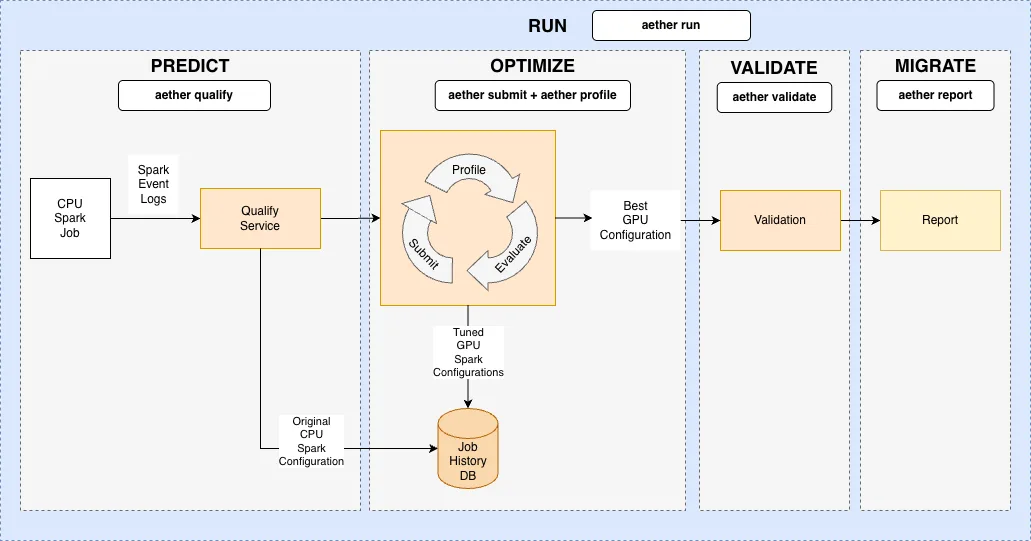
Aether 项目是一套微服务和流程,旨在实现 RAPIDS 加速器的自动迁移与优化,有效减少人工干预。 该项目通过以下方式缩短从 CPU 到 GPU 的 Spark 作业迁移时间:
- 使用推荐的 Bootstrap 配置对潜在的 GPU 加速进行预测的模型。
- 在沙盒环境中对 GPU 任务进行开箱即用的测试与调优。
- 智能优化成本与执行时间。
- 与 Amazon EMR 支持的工作负载实现全面集成。
Amazon EMR 集成
现在,Aether 项目已支持 Amazon EMR 平台,能够自动管理 GPU 测试集群,并实现 Spark 任务的转换与优化。用户可通过该服务,将现有的 EMR CPU Spark 工作负载顺利迁移至 GPU。
设置和配置
首先,您需满足以下前提条件。
- EC2 上的 Amazon EMR: 具备 GPU 实例配额的 AWS 帐户
- AWS CLI: 使用 aws configure 命令进行配置
- Aether NGC: 申请访问权限,通过 ngc config 设置配置凭据,并依照 Aether 安装指南执行操作
为 EMR 配置 Aether
安装 Aether 包后,使用以下命令为 EMR 平台配置 Aether 客户端:
# Initialize and list config
$ aether config init
$ aether config list

# Select EMR platform and region
$ aether config set core.selected_platform emr
$ aether config set platform.emr.region <region>

# Set required EMR s3 paths
$ aether config set platform.emr.spark_event_log_dir <s3_path_for event_logs>
$ aether config set platform.emr.cluster.artifacts_path <s3_path_for uploading_aether_artifacts>
$ aether config set platform.emr.cluster.log_path <s3_path_for_cluster_log_uri>
Aether EMR 迁移工作流示例
Aether CLI 工具为运行服务提供了多个模块化命令。每个命令均会显示一个汇总表,并在作业历史记录数据库中跟踪每次运行。请参阅“ 4。迁移:报告和推荐’’以查看跟踪的作业。如需了解每个 aether 命令的更多详细信息,请使用 --help 选项。
示例 EMR 工作流需要从现有的 Spark 步骤开始,该步骤的 ID 为 s-XXX,运行在 CPU EMR 集群上,集群 ID 为 j-XXX。有关向 EMR 集群提交步骤的更多信息,请参阅 Amazon EMR 文档。
迁移过程分为四个核心阶段:预测、优化、验证与迁移。
1. 预测:资格
评估 CPU Spark 作业在 GPU 加速方面的可行性,并提出初步优化建议。
该验证工具采用 QualX 机器学习系统的 XGBoost 模型,基于从 CPU 事件 log.om 和 CPU 事件日志中提取的工作负载特征,预测潜在的 GPU 加速能力与兼容性。
输入:
- CPU 事件日志可通过 EMR 步骤和集群 API 获取,或由用户直接提供。
输出:
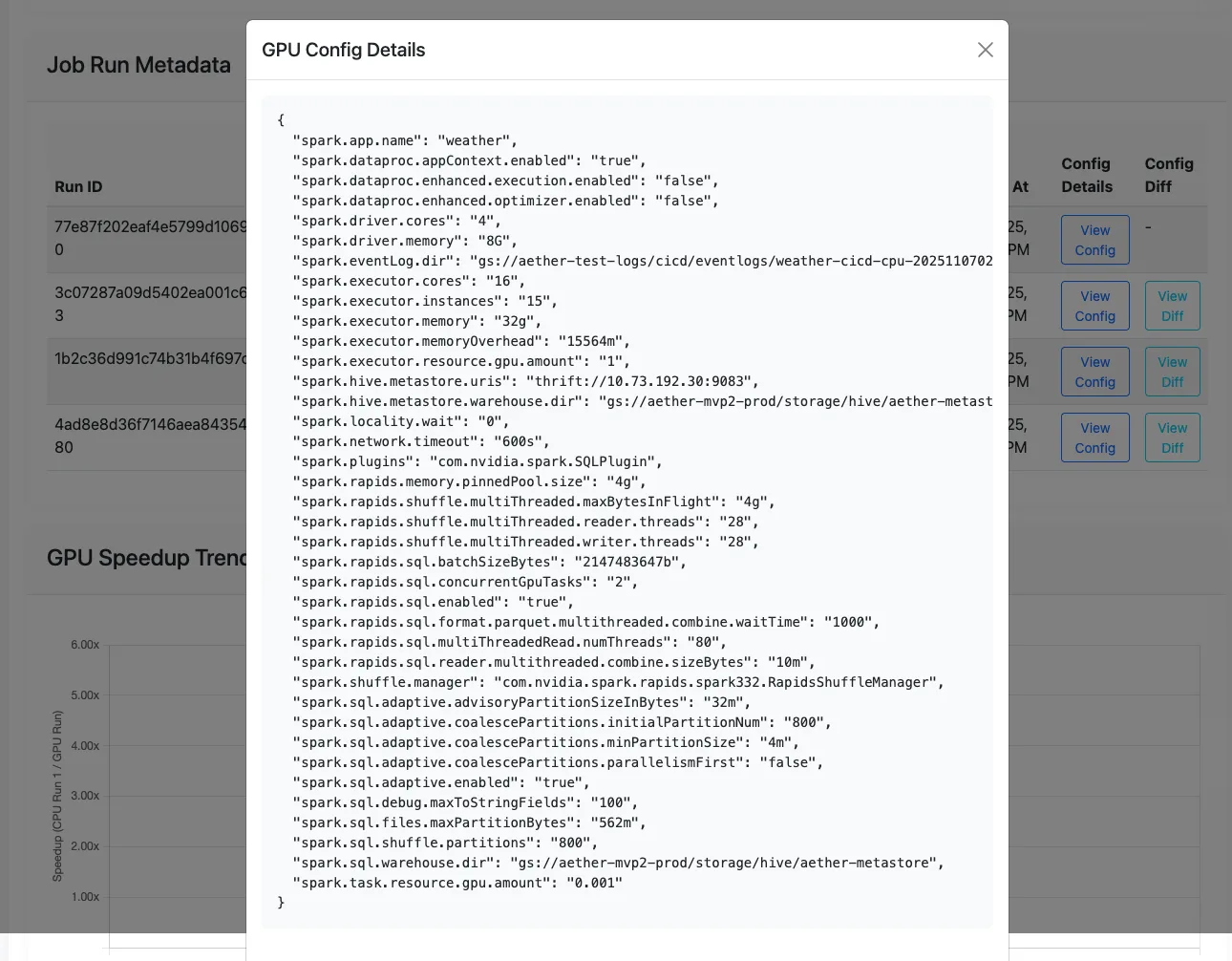
- 由 AutoTuner 生成的推荐 Spark 配置参数。
- 推荐的 GPU 集群架构、实例类型及数量均经过优化,以实现成本节约。
- Aether 作业 ID 用于追踪本次作业及后续相关作业的执行情况。
命令:
# Option 1: Use Platform IDs
$ aether qualify --platform_job_id <cpu_step_id> --cluster_id <cpu_cluster_id>

# Option 2: Provide event log path directly
$ aether qualify --event_log <s3_or_local_event_log_path>
2. 优化:自动测试和调整
通过在 GPU 集群上测试作业并迭代调整 Spark 配置参数,以实现更优的性能与成本效益。
使用集群服务创建 GPU 测试集群,再通过迭代执行 submit 和 profile 的 tune 服务来优化 GPU 作业:
- 提交: 作业提交服务负责将 Spark 作业提交至具备指定配置的 GPU 集群。
- 配置文件: 配置文件服务利用分析工具处理 GPU 事件日志,识别性能瓶颈,并生成优化后的 Spark 配置参数,以提升性能和/或降低运行成本。
输入:
- 为 GPU 作业推荐符合要求的输出结果中的 Spark 配置参数。
- 从限定输出到创建 GPU 集群,推荐合适的 GPU 集群规格。
输出:
- 最佳GPU配置 是选取运行时间最短的一次所对应的GPU配置作为最佳配置。
命令:
A.。创建测试 EMR GPU 集群:
# Option 1: Use the recommended cluster shape ID with a default cluster configuration
$ aether cluster create --cluster_shape_id <recommended_cluster_shape_id_from_qualify>

# Option 2: Provide a custom configuration file
$ aether cluster create --cluster_shape_id <recommended_cluster_shape_id_from_qualify> --config_file <custom_cluster_yaml_file>
B。将 GPU 步骤提交至集群:
# Submit the job to the cluster using config_id and cluster_id
$ aether submit --config_id
<recommended_spark_config_id_from_qualify> --cluster_id
<gpu_cluster_id_from_create>
C. 配置 GPU 运行以生成新的推荐 Spark 配置:
# Profile the job using the step_id and cluster_id
$ aether profile --platform_job_id <gpu_step_id_from_submit>
--cluster_id <gpu_cluster_id_from_create>
D. 以迭代方式调整作业(提交与配置文件循环)::
# Tune the job for 3 iterations
$ aether tune --aether_job_id <aether_job_id> --cluster_id
<gpu_cluster_id_from_create> --min_tuning_iterations 3
3. 验证:数据完整性检查
确保 GPU 作业的输出结果与原始 CPU 作业一致,以验证其输出的完整性。
验证服务会比较从事件日志中检索到的关键行指标,特别侧重于表现优异的 GPU 运行 与原始 CPU 运行 之间的行读取和写入。
命令:
# Validate the CPU and GPU job metrics
$ aether validate --aether_job_id <aether_job_id>
4. 迁移:报告和建议
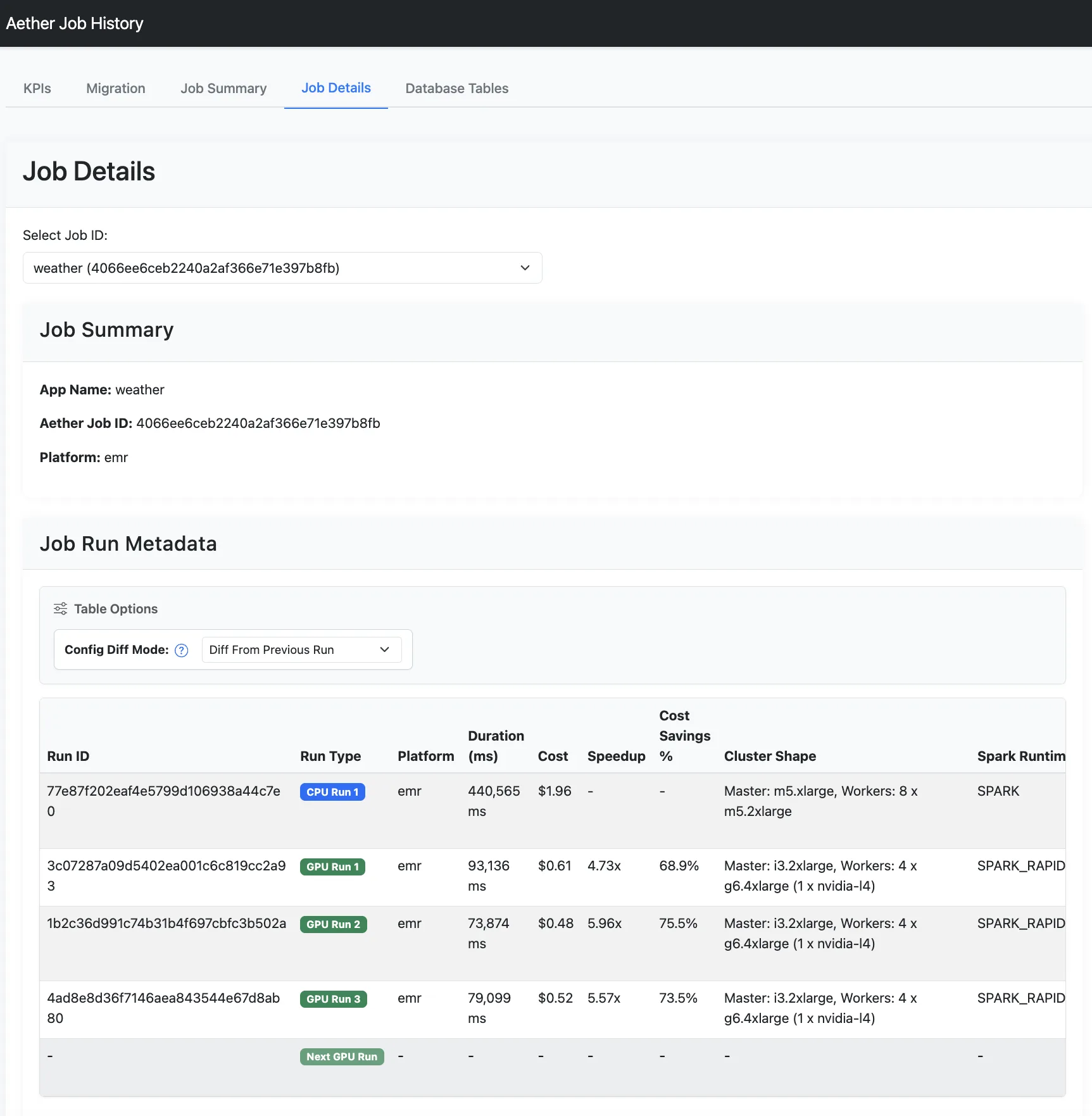
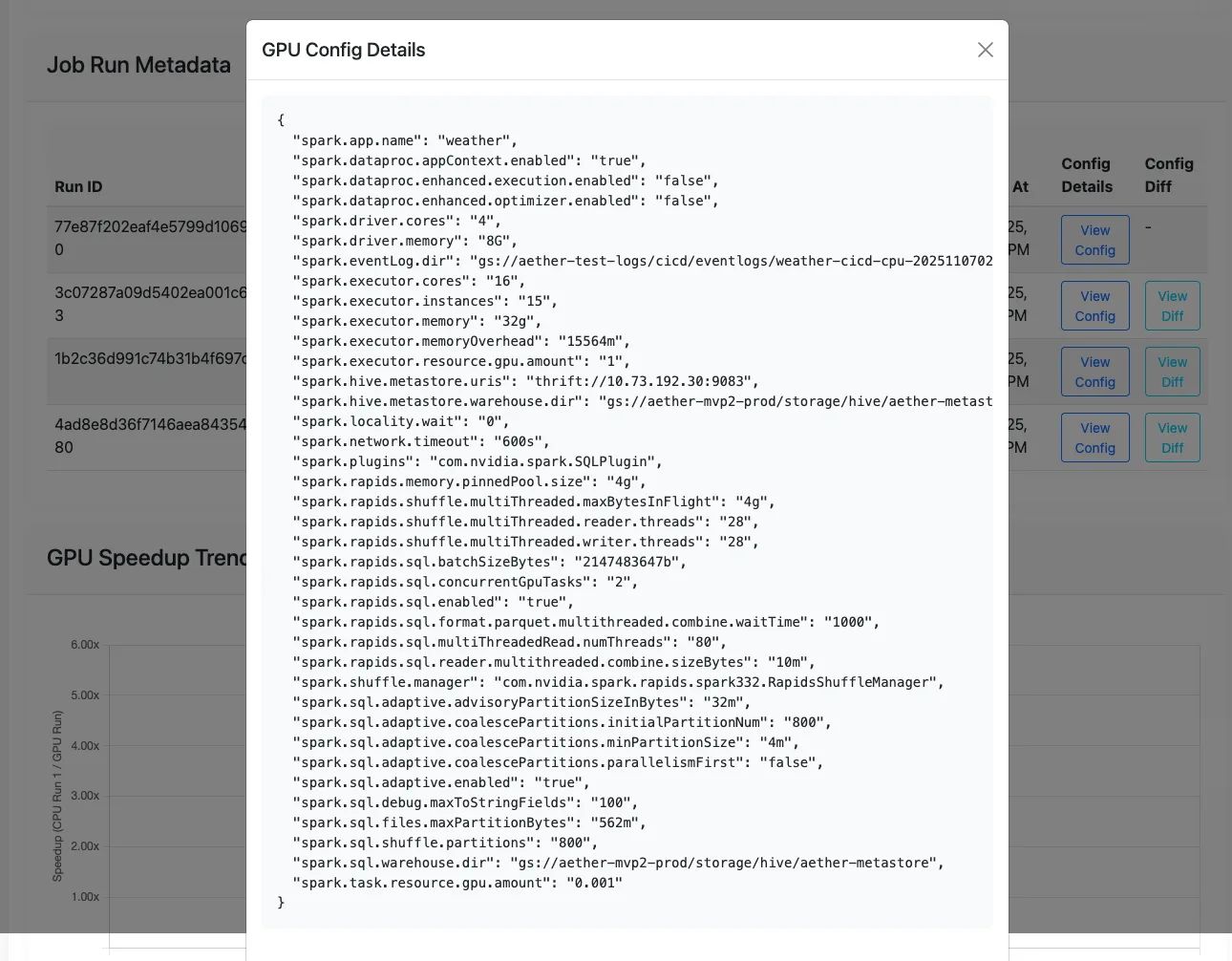
在作业历史数据库中查看追踪作业的详细报告,并获取基于优化 Spark 配置参数 和 GPU 集群配置 的每项作业迁移建议。
报告服务提供了用于显示的 CLI 和 UI 选项:
- 关键性能指标 (KPI): 所有作业的总体加速效果及节省的总成本。
- 工作列表: 每项作业的加速情况、节省的成本以及迁移建议。
- 作业详细信息: 每项作业的所有运行记录(包括原始 CPU 运行与 GPU 调优运行)的指标与详细信息。
命令:
# List all job reports
$ aether report list

# View all job runs for a specific job
$ aether report job --aether_job_id <aether_job_id>

# Start the Aether UI to view the reports in a browser
$ aether report ui
5. 自动运行
将上述所有独立服务整合为一条自动化 Aether 运行命令:
# Run full Aether workflow on CPU event log
$ aether run --event_log <s3_or_local_event_log_path>
总结
Aether 项目是一款用于加速大数据处理的高效工具,可缩短在 GPU 上迁移和运行大规模 Apache Spark 工作负载所需的时间,并降低相关成本。
要尝试大规模迁移 Apache Spark 工作负载,请申请访问 Project Aether 。如需深入了解 RAPIDS 插件,请参阅适用于 Apache Spark 的 RAPIDS 加速器文档。