虽然消费者 AI 提供了强大的功能,但工作场所工具通常会因数据不连贯和上下文有限而受到影响。 基于 LangChain 构建,NVIDIA AI-Q 蓝图 是一个能够弥合这一差距的开源模板。LangChain 最近推出了 一个基于 NVIDIA AI 构建的企业智能体平台,支持可扩展的生产就绪型智能体开发。
本教程可作为 NVIDIA Launchable 提供,它向开发者展示了如何使用 AI-Q 蓝图来创建超越排行榜并可连接到企业系统的深度研究智能体。该蓝图使用出色的开放和前沿 LLM,使用 NVIDIA NeMo Agent Toolkit 进行优化,并通过 LangSmith 进行监控。结果:代理式搜索应用能够将业务数据精确保存在其所属的位置 (隐私和安全环境) ,从而加快生产速度。
NVIDIA AI-Q blueprint 和 NeMo Agent Toolkit 都是更广泛的 NVIDIA Agent Toolkit 的一部分,后者是用于构建、评估和优化安全、长期运行的自主智能体的工具、模型和运行时集合。
构建内容:深度智能体
您将学习:
- 如何使用 LangChain 为企业搜索用例部署 NVIDIA AI Q 蓝图
- 如何使用 Nemotron 和前沿 LLM 配置浅层和深度研究智能体
- 如何使用 LangSmith 和 NVIDIA 工具监控智能体追踪和性能
- 如何通过 NeMo Agent Toolkit 工具连接企业内部数据源
设置
- NVIDIA API 密钥 用来访问 Nemotron 3 等开放模型
- NVIDIA API 密钥 用于访问 Nemotron 3 等开放模型
- 用于访问 GPT-5.2 等前沿模型的 OpenAI API 密钥
- 用于网页搜索的 Tavily API Key
- Python
- Docker Compose
- 可选:LangSmith 用于监控和实验跟踪
如何使用 NVIDIA 和 LangChain 构建长期运行的数据智能体
安装并运行 Blueprint
克隆 资源库 并配置 API 密钥。首先复制环境模板。
cp deploy/.env.example deploy/.env |
打开deploy/.env并填写所需的值。
# RequiredNVIDIA_API_KEY=nvapi-...TAVILY_API_KEY=tvly-...# Optional: enables trace monitoring (covered later in this post)LANGSMITH_API_KEY=lsv2-... |
这个NVIDIA_API_KEY允许访问 NVIDIA 托管的模型,例如 Nemotron 3 Nano。这个TAVILY_API_KEY启用 Web 搜索。
接下来,构建并启动完整堆栈。同时启动多个容器意味着,根据您的互联网连接和硬件规格,首次构建可能需要几分钟时间。
docker compose -f deploy/compose/docker-compose.yaml up --build |
这将启动三项服务:
- aiq-research-assistant: 端口 8000 上的 FastAPI 后端
- postgres: 用于异步作业状态和对话检查点的 PostgreSQL 16
- 前端: 端口 3000 上的 Next.js Web UI
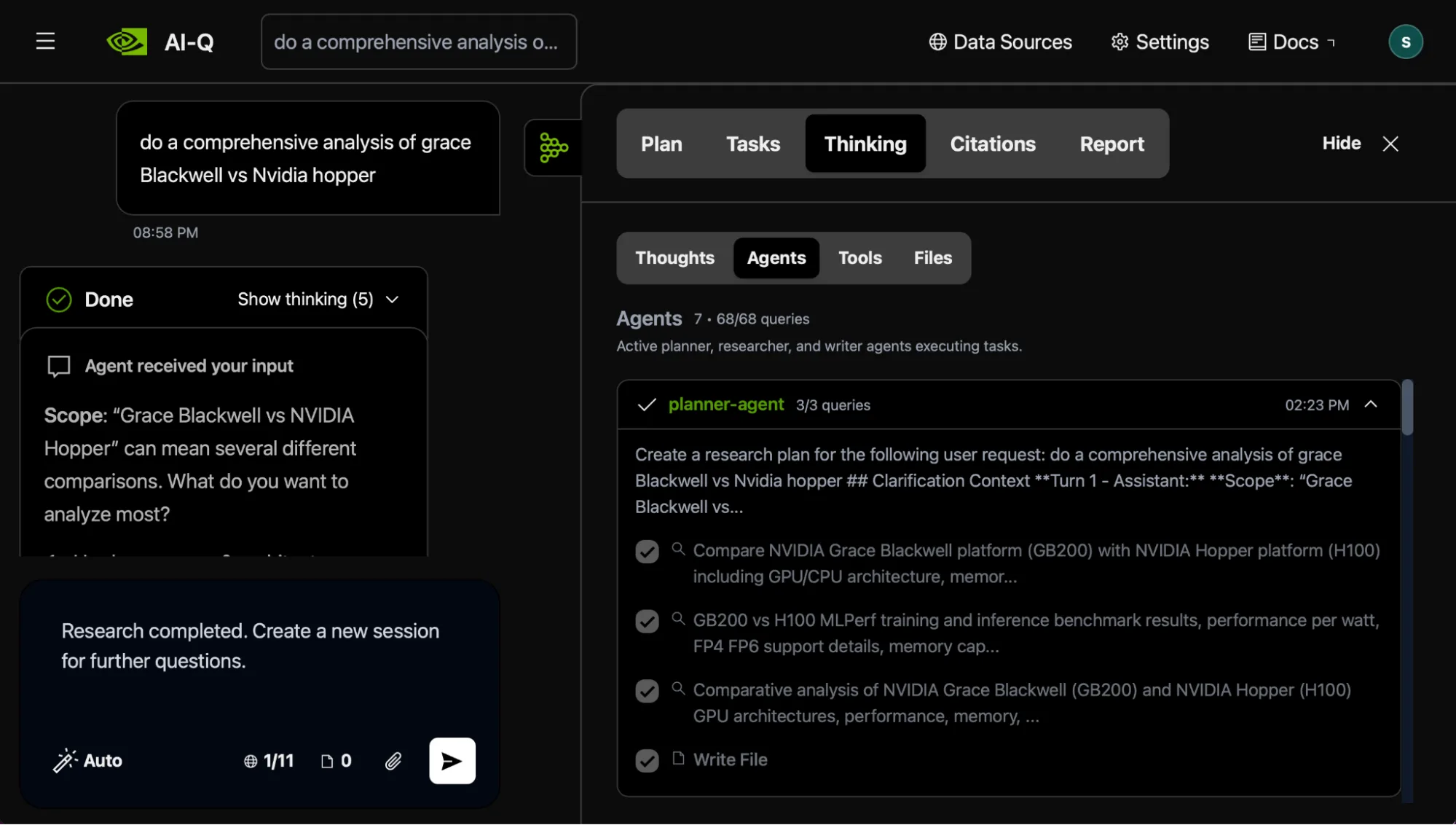
所有服务报告健康后,打开 http:// localhost:3000。下面的图 1 显示了 AI-Q 研究助理聊天界面,您可以在其中输入研究查询并实时查看智能体的工作情况。
自定义 AI-Q:工作流、追踪和模型配置
打开configs/ config_web_docker.yml。此单个文件控制 LLM、工具、代理和工作流程配置。
这个llms“section” (部分) 声明命名模型。请注意启用_ 思考标志 – 它可以为 Nemotron 打开或关闭思维链推理。以下示例声明了三个角色不同的 LLM:
llms: nemotron_llm_non_thinking: _type: nim model_name: nvidia/nemotron-3-super-120b-a12b temperature: 0.7 max_tokens: 8192 chat_template_kwargs: enable_thinking: false nemotron_llm: _type: nim model_name: nvidia/nemotron-3-super-120b-a12b temperature: 1.0 max_tokens: 100000 chat_template_kwargs: enable_thinking: true gpt-5-2: _type: openai model_name: 'gpt-5.2' |
nemotron_llm_non_thinking 可处理快速响应,其中思维链会增加延迟,但却无济于事。 nemotron_llm 为需要多步骤推理的智能体启用具有 10 万个上下文窗口的思考模式。 gpt-5.2 增加了用于编排的前沿模型。
该 blueprint 由浅层和深度研究智能体组成。以下配置同时显示了这两种情况:
functions: shallow_research_agent: _type: shallow_research_agent llm: nemotron_llm tools: - web_search_tool max_llm_turns: 10 max_tool_calls: 5 deep_research_agent: _type: deep_research_agent orchestrator_llm: gpt-5 planner_llm: nemotron_llm researcher_llm: nemotron_llm max_loops: 2 tools: - advanced_web_search_tool |
浅层研究智能体运行一个有界工具调用循环 (最多 10 次 LLM 回合和 5 次工具调用) ,然后返回带有引用的简洁答案。“什么是 CUDA?”等简单问题可在几秒钟内解决。深度研究智能体使用具有待办事项列表、文件系统和子智能体的 LangChain 深度智能体,生成长篇引文支持报告。
要在本地保留所有推理,请将 Orchestrator_llm 更改为指向自托管模型。
监控追踪
要监控 AI+ Q 智能体,请启用 LangSmith 追踪,以便每个查询生成完整的执行追踪,包括 LangChain 工具调用和模型使用情况。添加 LANGSMITH_API_KEY 到您的 deploy/.env 并将遥测部分添加到配置文件中:
general: telemetry: tracing: langsmith: _type: langsmith project: aiq-gtc-demo api_key: ${LANGSMITH_API_KEY} |
每个查询都会生成捕获完整执行路径的追踪。
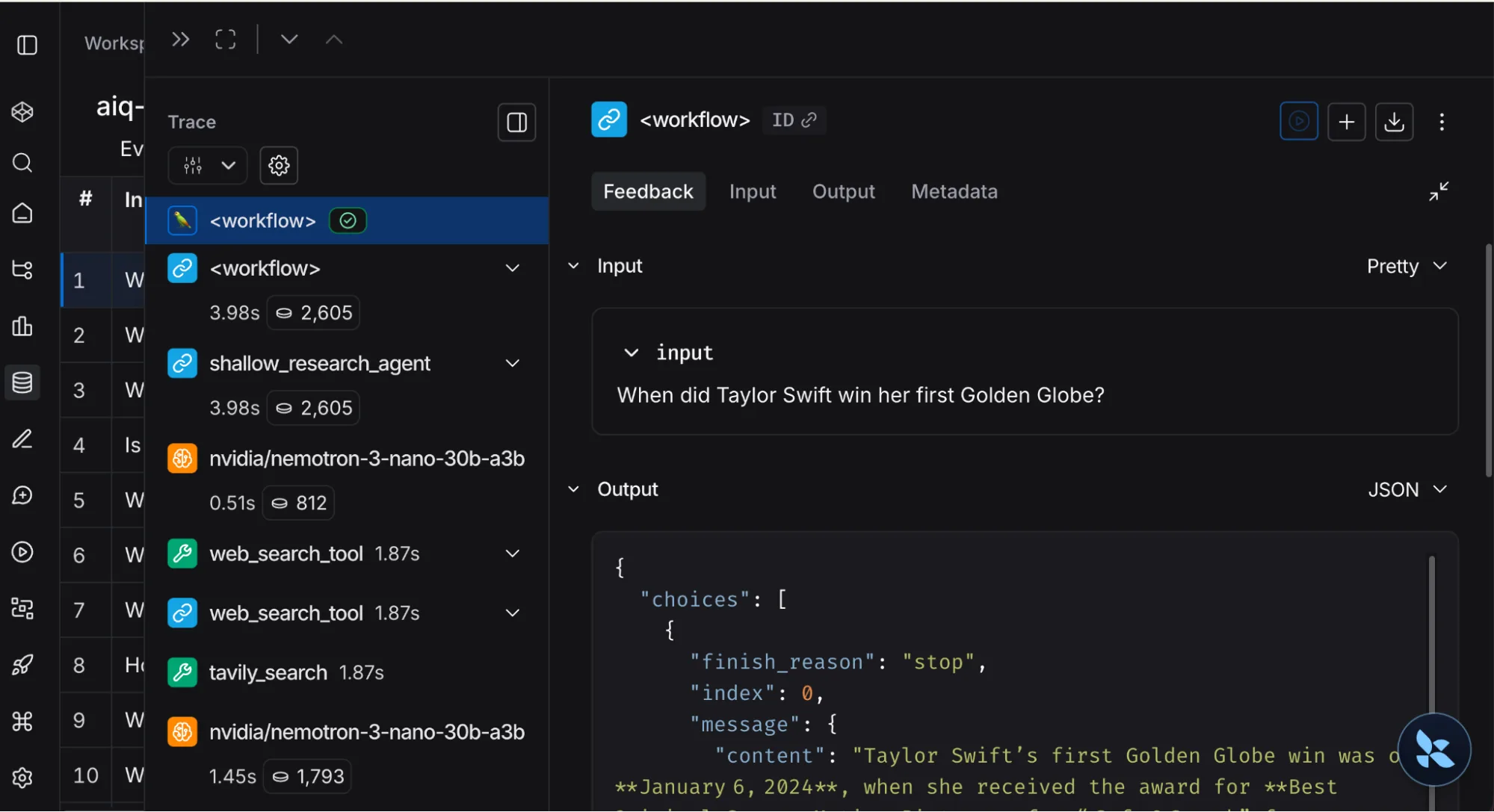
浅层研究样本查询:
What is the deepest place on earth? |
深度研究样本查询:
Analyze the current 2026 scientific consensus on the deepest points on Earth, comparing the Challenger Deep in the Mariana Trench to terrestrial extremes such as the Veryovkina Cave and the Kola Superdeep Borehole. Include the latest bathymetric and geodetic measurements, an assessment of measurement uncertainties (including gravity and pressure sensor corrections), and a summary of recent deep-sea expeditions from 2020–2026 that have updated our understanding of the Hadal zone's topography and biological life. |
展开追踪以检查每个节点。Web 搜索工具调用对于调试尤其有用,您可以确切地看到代理发送了哪些查询以及返回了哪些结果。除了单个追踪,还可以使用 LangSmith 追踪延迟、token 使用率和一段时间内的错误率,并设置回归警报。
优化 Deep 智能体
要针对您的领域调整深度研究智能体,请先检查其如何组装子智能体。深度研究智能体使用create_deep_agent来自 LangChain 的工厂deepagents库。
from deepagents import create_deep_agentreturn create_deep_agent( model=self.llm_provider.get(LLMRole.ORCHESTRATOR), system_prompt=orchestrator_prompt, tools=self.tools, subagents=self.subagents, middleware=custom_middleware, skills=self.skills,).with_config({"recursion_limit": 1000}) |
工厂将编排器 LLM、工具和两个子代理连接在一起。
self.subagents = [ { "name": "planner-agent", "system_prompt": render_prompt_template( self._prompts["planner"], tools=self.tools_info, ), "tools": self.tools, "model": self.llm_provider.get(LLMRole.PLANNER), }, { "name": "researcher-agent", "system_prompt": render_prompt_template( self._prompts["researcher"], tools=self.tools_info, ), "tools": self.tools, "model": self.llm_provider.get(LLMRole.RESEARCHER), },] |
上下文管理是深度智能体工作方式的核心。规划器智能体生成 JSON 研究计划。研究人员智能体仅接收此计划,而不是编排者思考的 tokens 或规划人员的内部 reasoning。通过仅传递一个结构化有效载荷,我们减少了 token 膨胀,并防止了“中间丢失”的现象,即 LLM 忘记了隐藏在大量上下文窗口中的关键指令。这种隔离可让每个子智能体保持专注。以下示例显示了有关检索增强生成 (RAG) 与长上下文方法的查询的规划器输出:
{ "report_title": "RAG vs Long-Context Models for Enterprise Search", "report_toc": [ { "id": "1", "title": "Architectural Foundations", "subsections": [ {"id": "1.1", "title": "Retrieval-Augmented Generation Pipeline"}, {"id": "1.2", "title": "Long-Context Transformer Architectures"} ] }, { "id": "2", "title": "Performance and Accuracy Trade-offs", "subsections": [ {"id": "2.1", "title": "Factual Accuracy and Hallucination Rates"}, {"id": "2.2", "title": "Latency and Throughput Benchmarks"} ] } ], "queries": [ { "id": "q1", "query": "RAG retrieval-augmented generation architecture components ...", "target_sections": ["Architectural Foundations"], "rationale": "Establishes baseline understanding of RAG pipelines" } ]} |
此架构已经过调整,可在 Deep Research Bench 和 Deep Research Bench II 上表现出色。
要为您的域自定义代理,请在src/ aiq_aira/ agents/ deep_researcher/ prompts/。例如,打开planner.j2并指示规划器将大纲保留在三个或更少的部分,以便生成更有针对性的报告。您还可以添加其他调试日志记录来检查中间状态 (例如/ planner_output.md) ,以了解您的提示更改如何影响子代理之间传递的上下文。
添加数据源
该蓝图将每个工具作为 NeMo Agent Toolkit 功能实现。要连接新的企业数据源,请实现 NeMo Agent Toolkit 函数,并在配置中引用该函数。
第 1 步:实现 NeMo Agent Toolkit 功能
以下示例连接到内部知识库 API:
# sources/internal_kb/src/register.pyfrom pydantic import Field, SecretStrfrom nat.builder.builder import Builderfrom nat.builder.function_info import FunctionInfofrom nat.cli.register_workflow import register_functionfrom nat.data_models.function import FunctionBaseConfigclass InternalKBConfig(FunctionBaseConfig, name="internal_kb"): """Search tool for the internal knowledge base.""" api_url: str = Field(description="Knowledge base API endpoint") api_key: SecretStr = Field(description="Authentication key") max_results: int = Field(default=5)@register_function(config_type=InternalKBConfig)async def internal_kb(config: InternalKBConfig, builder: Builder): async def search(query: str) -> str: """Search the internal knowledge base for relevant documents.""" results = await call_kb_api(config.api_url, query, config.max_results) return format_results(results) yield FunctionInfo.from_fn(search, description=search.__doc__) |
NeMo Agent Toolkit 会在启动时验证配置字段,因此错误配置会快速失败。智能体将使用函数的文档字符串来决定何时调用该工具。
第 2 步:参考配置中的工具
在下方声明新工具函数然后将其添加到每个智能体工具list:
functions: internal_kb_tool: _type: internal_kb api_key: ${INTERNAL_KB_API_KEY} max_results: 10 shallow_research_agent: _type: shallow_research_agent llm: nemotron_llm tools: - web_search_tool - internal_kb_tool deep_research_agent: _type: deep_research_agent orchestrator_llm: gpt-5 planner_llm: nemotron_llm researcher_llm: nemotron_llm tools: - advanced_web_search_tool - internal_kb_tool |
您无需更改任何代理代码。智能体会自动发现新工具的名称和描述,当查询匹配时,LLM 会调用该工具。使用相同的模式连接您自己的企业系统,或利用 MCP (模型上下文协议) 授予智能体对现有工具的访问权限。这可确保您的研究堆栈保持私密性,并与对您的组织最重要的数据深度集成。
深入了解
通过扩展和构建 NVIDIA AI-Q 蓝图,开发者能够将一流的 LangChain 深度智能体架构引入企业。如需进一步了解,请查看:
- 用于添加更多数据源的 Blueprint 定制指南
- 用于在 AI 工厂部署的 Helm Chart
- 用于进行评估驱动开发的 Blueprint 评估指南
- LangSmith,用于监控生产中的系统并防止性能漂移
生态系统中的合作伙伴正在集成 NVIDIA AI-Q Blueprint,包括: Amdocs, Cloudera, Cohesity, Dell, Distyl, H2O.ai, HPE, IBM, JFrog, LangChain, ServiceNow, 和 VAST.